Active Command - Mark Disk Partition as Active
The DiskPart is a command-line utility that allows users to manage their disk partitions. It has support for various commands, one among them is the “active” command.
The active command in DiskPart is used to mark a partition as active. This command marks the selected partition as active on the basic disk. It allows users to manage their disk partitions effectively.
Syntax
The “active” command in DiskPart in its syntax, requires no additional parameters. To activate a partition, simply type:
active
In this article, we will discuss the active command in DiskPart and how to mark a partition as active.
How to Set Partition as Active Partition
To activate the partition in the basic dis with multiple partitions, follow the step-by-step process:
- Open the Cmd: Open the command prompt with administrative privileges.
- Launch DiskPart: Type the “
diskpart” and hit enter.
diskpart
- List Disks: List the available disks by typing the “
list disk”. Identify the disk containing the partition you want to make active.
list disk
- Select Disk: Type “
select the disk X”, where “X” represents the disk number.
select disk 0
- List the Partitions: Type “
list partition” on the selected disk to list the partitions available.
list partition
- Identify the partition you want to mark as active based on its size, and type.
- Select the partition: Type “
select partition Y”, where “Y” is the partition number.
select partition 0
- active: Type command “active” to mark the selected partition as active.
active
Refer to the following code to activate the partition on the disk.
DISKPART> list disk
DISKPART> select disk X
DISKPART> list partition
DISKPART> select partition Y
DISKPART> active
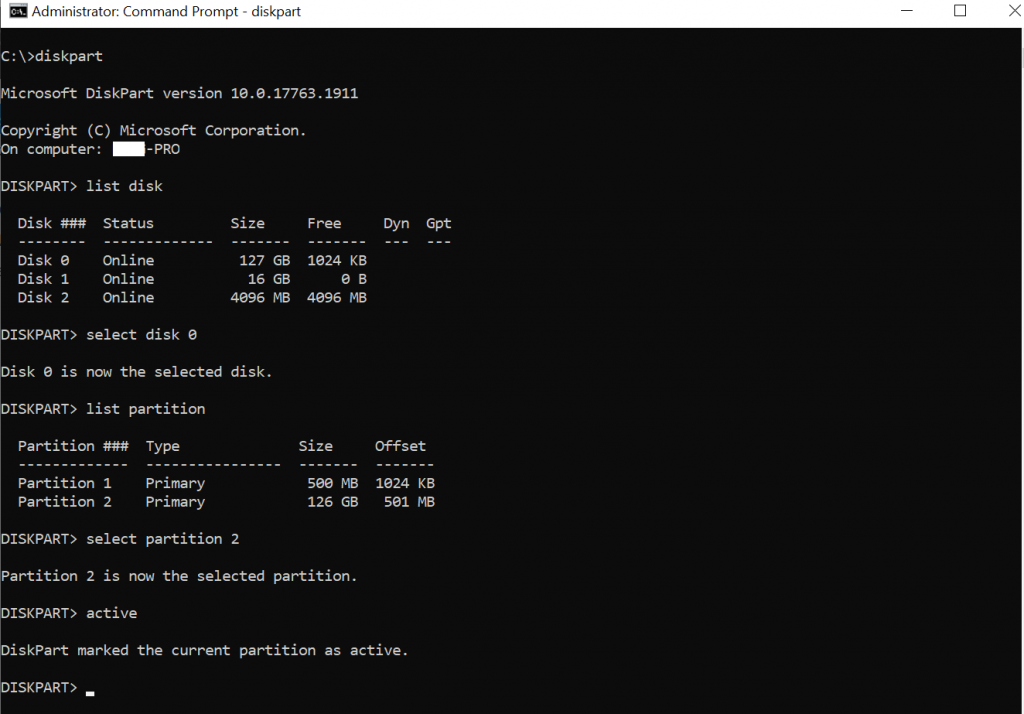
Upon executing the “active” command, the DiskPart will mark the selected partition as active on the basic disk.
The output of the above command is given below.
Conclusion
I hope the above article on the “active” command in the DiskPart and its usage to mark the selected partition on the basic disk as active is helpful to you.
Important Tip: It’s essential to exercise caution when using the “active” command in DiskPart. The DiskPart doesn’t verify the contents of the partition. If you mistakenly mark a partition as active, and it does not contain the necessary operating system startup files, your computer might not boot up properly.
You can find more topics about Active Directory tools and PowerShell basics on the ActiveDirectoryTools home page.