How to Get Process Id Using PowerShell
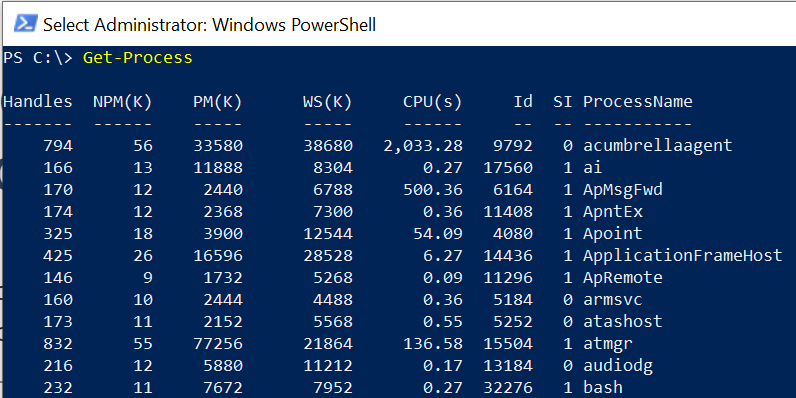
The Get-Process cmdlet in PowerShell is used to retrieve information about running processes on the system. The Get-Process command has Id parameter which specifies the process id.
To find the process id (PID) of a process, type the Get-Process command.
Get-Process
In this article, we will discuss how to get process id (PID) using the Get-Process command in PowerShell.
How to Get Process ID of Given Process
To get the process id of a given process, use the Get-Process cmdlet and specify the name of the process for which you want to retrieve the process id.
Get-Process -Name "notepad*" | Select-Object ProcessName, Id
In the above PowerShell script, the Get-Process command retrieves the list of the process where the process names start with “notepad” and pipes them into the Select-Object cmdlet to display the process name and process id.
The output of the above PowerShell script to find the process id of a given process is:
PS C:\> Get-Process -Name "notepad*" | Select-Object ProcessName, Id

ProcessName    Id
-----------    --
notepad      2448
notepad     21816
notepad     35568
The Get-Process cmdlet in the above script retrieves the list of processes with their process id in sorted.
How to Get Process ID of PowerShell Process
$PID is an automatic variable and contains the process id of the process hosting the current PowerShell session. The following script gets the process id of the Powershell process.
Get-Process -Id $PID
In the above PowerShell script, the Get-Process cmdlet uses the Id parameter to specify the process id stored in the $PID variable and retrieves the information about the PowerShell process.
The output of the above PowerShell script gets the process name and ID of the PowerShell process.
How to Get Process Id by its Service Name
To get the process id by its service name such as WinDefend, use the Get-CimInstance cmdlet that uses win32_service class to get information about the underlying process that runs the service and filter by Name like ‘WinDefend’ and select its ProcessId.
$id = Get-CimInstance -Class Win32_Service -Filter "Name LIKE 'WinDefend'" | Select-Object -ExpandProperty ProcessId

Get-Process -Id $id
The output of the above PowerShell script displays the process id, process information of a service.
PS C:\> $id = Get-CimInstance -Class Win32_Service -Filter "Name LIKE 'WinDefend'" | Select-Object -ExpandProperty ProcessId

PS C:\> Get-Process -Id $id

Handles  NPM(K)    PM(K)      WS(K)     CPU(s)     Id  SI ProcessName
-------  ------    -----      -----     ------     --  -- -----------
    751      86   223020      25264      53.77   6680   0 MsMpEng


PS C:\>
Conclusion
I hope the above article on how to get process id in PowerShell using the Get-Process command is helpful to you.
The Get-Process cmdlet in PowerShell retrieves the list of all processes running on the local computer. Use the ID parameter to get the process id.