How to Get File Version in PowerShell
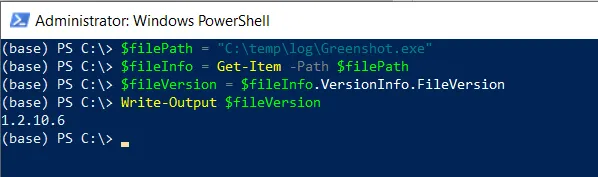
To get the file version in PowerShell, you can use the Get-Item cmdlet to get the FileInfo object and then use its VersionInfo property.
Get File Version In PowerShell
To get the file version in PowerShell, use the VersionInfo property of the FileInfo object. The Get-Item cmdlet returns the FileInfo object.
# specify the file path

$filePath = "C:\temp\log\Greenshot.exe"

# Get the file info

$fileInfo = Get-Item -Path $filePath

# Get the file version
$fileVersion = $fileInfo.VersionInfo.FileVersion

# Out the file version
Write-Output $fileVersion
In this script, the Get-Item cmdlet with the -Path parameter gets the FileInfo object for the file “Greenshot.exe”.
Finally, we access the FileVersion property of the VersionInfo property of the $fileInfo object to get the file version.
After running the script, it returns the file version “1.2.10.6”.
Note that the file must have version information embedded in it. (usually exe or DLLs) file has version information.
Conclusion
I hope the above article on getting the file version in PowerShell is helpful to you.