PowerShell Get Process Name
PowerShell Get Process Name
The Get-Process cmdlet in PowerShell is used to retrieve information about running processes on your system, it has the process name as one of the primary properties. Using the Name parameter in the Get-Process cmdlet, you can get the process name.
In this article, we will discuss how to get a process name, using a wildcard character to get a process name.
How to Get Process Name in PowerShell
Using the Get-Process cmdlet in PowerShell, you can get the process name. Use the Name parameter to specify the exact process name you want to retrieve.
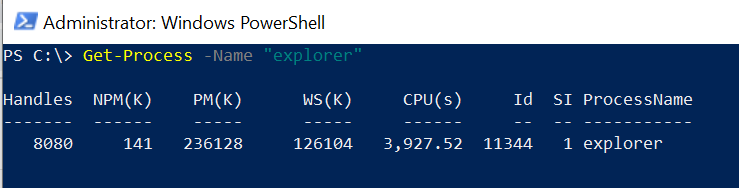
Get-Process -Name "explorer"
In the above PowerShell script, the Get-Process cmdlet uses the parameter Name ‘explorer’ and retrieves the process name.
The output will display the process information including Handles, NPM(K), PM(K), WS(K), CPU(s), and Id.
Get Process Name Using Wildcard
You can use wildcard characters with the -Name parameter to get processes that match a pattern.
Get-Process -Name "chrome*"
This will return all processes whose names start with “chrome”.
Get All Process Names
To get a list of all process names running on your system:
Get-Process | Select-Object -Property Name
This returns just the names of all running processes.
Get Process Name and Path
To get both the process name and its executable path:
Get-Process | Select-Object -Property Name, Path
Conclusion
I hope the above article on how to get process name in PowerShell using the Get-Process cmdlet is helpful to you.
The Get-Process cmdlet is a powerful tool for managing and monitoring processes on your Windows system.