Using Select-Object to Get Nested Property in PowerShell
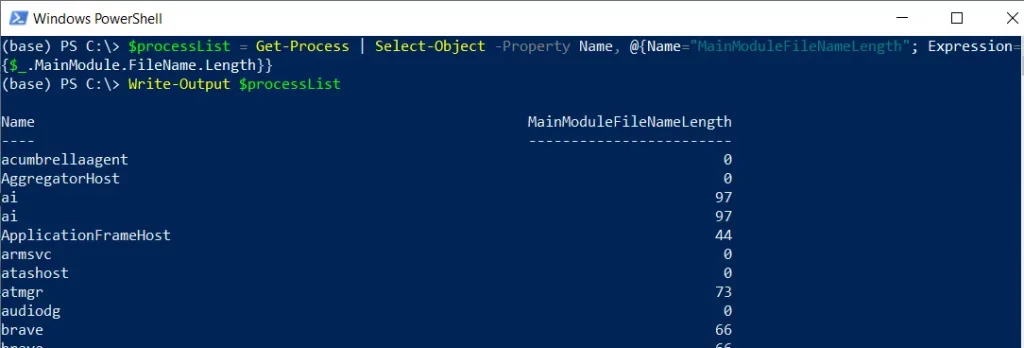
In PowerShell, you can use the Select-Object cmdlet along with calculated properties to select the nested properties. The calculated properties are useful when you want to retrieve specific information from nested objects.
The following methods show how you can do it with syntax.
Method 1: Selecting nested properties
$processList = Get-Process | Select-Object -Property Name, @{Name="MainModuleFileNameLength"; Expression={$_.MainModule.FileName.Length}}

$processList
This example will return the process name and MainModuleFileName as nested properties from the object.
Method 2: Selecting nested properties from the custom object
$object = @(
[PSCustomObject]@{Name = "Gary"; Address = @{City = "New York"; Zip = "10001"}}
)

# Select nested properties
$selectedProperties = $object | Select-Object -Property Name, @{Name="City"; Expression={$_.Address.City}}, @{Name="Zip"; Expression={$_.Address.Zip}}

$selectedProperties
This example will return the nested properties of the custom object.
The following examples show how you can use these methods.
Get Nested Properties Using Select-Object in PowerShell
You can use the Select-Object cmdlet in PowerShell to select the nested properties.
# Get processes and select nested properties
$processList = Get-Process | Select-Object -Property Name, @{Name="MainModuleFileNameLength"; Expression={$_.MainModule.FileName.Length}}

# Output the processes with the selected nested properties
Write-Output $processList
Output:
Name                      MainModuleFileNameLength
----                      ------------------------
ApplicationFrameHost                            85
armsvc                                          72
audiodg                                         65
In this example, the Get-Process cmdlet gets the processes and pipes them to the Select-Object cmdlet to select the property and nested property. In this example, the length of the main module’s file name is a nested property.
It stores the processes with the selected nested properties in the $processList variable.
Finally, we use the Write-Output cmdlet to output the processes with the selected nested properties.
Get Nested Properties from Custom Object
You can also select nested properties from custom objects:
# Create a custom object with nested properties
$objects = @(
    [PSCustomObject]@{Name = "Gary"; Address = @{City = "New York"; Zip = "10001"}}
    [PSCustomObject]@{Name = "Tom"; Address = @{City = "Los Angeles"; Zip = "90001"}}
)

# Select nested properties
$selectedProperties = $objects | Select-Object -Property Name, @{Name="City"; Expression={$_.Address.City}}, @{Name="Zip"; Expression={$_.Address.Zip}}

# Output the result
Write-Output $selectedProperties
Output:
Name  City        Zip
----  ----        ---
Gary  New York    10001
Tom   Los Angeles 90001
In this example, we create custom objects with nested Address properties.
We then use calculated properties with @{Name="..."; Expression={...}} syntax to extract the nested City and Zip properties.
Conclusion
I hope the above article on selecting nested properties using the Select-Object cmdlet in PowerShell is helpful to you.