Find Modules in PowerShell
Find Modules in PowerShell
The Find-Module cmdlet finds modules in a repository that match the specified criteria. It returns a PSRepositoryInfo object for each module it finds.
If no parameter is used that limits the version, Find-Module returns the latest version of the module.
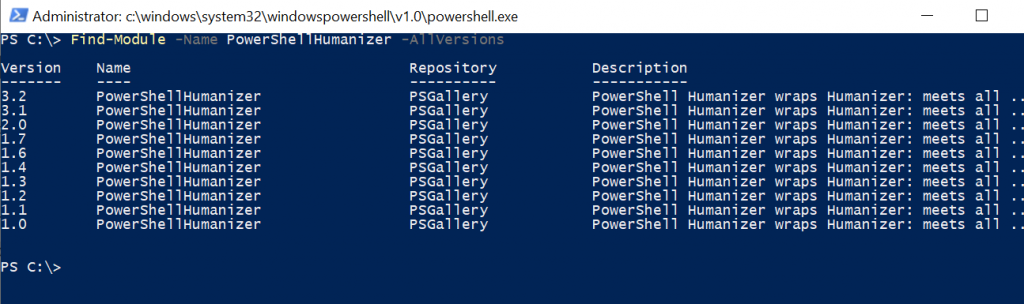
To get a list of module versions in PowerShell, use the AllVersion parameter.
How to Find Module by Name
Use the Find-Module cmdlet to find a module by name in the default repository.
The Find-Module uses the Name parameter to specify the PowerShellGet module and returns its information.
Find-Module -Name PowerShellGet
The output of the above PowerShell script finds a module in the repository and displays the module version, name, repository name, and description.
PS C:\> Find-Module -Name PowerShellGet
Version    Name                                Repository           Description
-------    ----                                ----------           -----------
2.2.5      PowerShellGet                       PSGallery            PowerShell module with commands for discovering,...
Find Modules with Similar Names
Use the Find-Module to find modules in the repository. If you want to find modules starting with a name, use an asterisk (*) wildcard with the module name.
Find-Module -Name xSQL*
In the above PowerShell script, the Find-Module cmdlet finds modules that contain the xSQL name in it.
The output of the above PowerShell script is:
PS C:\> Find-Module -Name xSQL*
Version      Name                      Repository         Description
-------      ----                      ----------         -----------
1.0          xSql                      PSGallery          The xSqlPs module is part of the Windows PowerSh...
9.1.0.0      xSQLServer                PSGallery          Module with DSC Resources for deployment and con...
1.4.0.0      xSqlPs                    PSGallery          SQL module.
How to Find Module by Minimum Version
Find-Module cmdlet uses the MinimumVersion parameter to search for a module’s minimum version. However, if the repository contains a newer version of the module, it returns the latest version.
Find-Module -Name PowerShellHumanizer -MinimumVersion 1.6
In the above PowerShell script, the Find-Module cmdlet uses the Name parameter to specify the module name PowerShellHumanizer and the MinimumVersion parameter to specify version 1.6
However, the repository contains the newer version of the module, hence the newer version is returned.
PS C:\> Find-Module -Name PowerShellHumanizer -MinimumVersion 1.6
Version    Name                                Repository     Description
-------    ----                                ----------     -----------
3.2        PowerShellHumanizer                 PSGallery      PowerShell Humanizer wraps Humanizer: meets all ...
Find a Module by Specific Version
The Find-Module cmdlet has a RequiredVersion parameter to search for a specific version in the repository. If the required version matches, it returns the results else an error is returned.
Find-Module -Name PowerShellHumanizer -RequiredVersion 1.2
In the above PowerShell script, the Find-Module cmdlet uses the Name parameter to specify the module name PowerShellHumanizer. It uses the parameter RequiredVersion to specify version 1.2.
The above script finds the module by its version and gets module information as follows:
PS C:\> Find-Module -Name PowerShellHumanizer -RequiredVersion 1.2
Version    Name                                Repository           Description
-------    ----                                ----------           -----------
1.2        PowerShellHumanizer                 PSGallery            PowerShell Humanizer wraps Humanizer: meets all ...
However, if we specify the version which is not available, Find-Module returns an error.
Find a Module in Specified Repository
Use the Find-Module cmdlet with the Repository parameter to search for a module in the specific repository.
Find-Module -Name PowerShellHumanizer -Repository PSGallery
The output of the above PowerShell script gets the module version, name, and repository name.
PS C:\> Find-Module -Name PowerShellHumanizer -Repository PSGallery
Version    Name                                Repository           Description
-------    ----                                ----------           -----------
3.2        PowerShellHumanizer                 PSGallery            PowerShell Humanizer wraps Humanizer: meets all ...
Conclusion
I hope the above article on how to use the Find-Module cmdlet to get the module version and find a module in the specified repository is helpful to you.