How to Use the Find-Command Cmdlet in Powershell
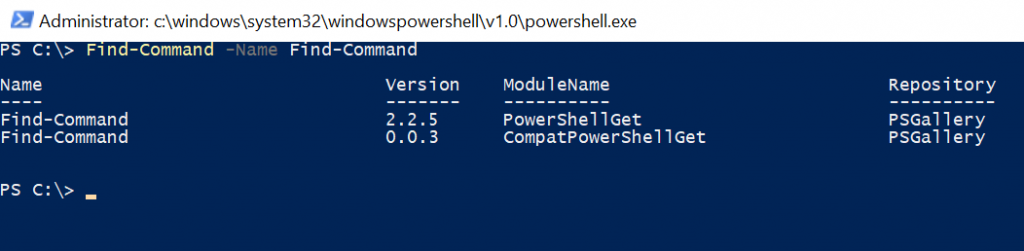
The Find-Command cmdlet in PowerShell is a powerful tool that helps locate cmdlets, aliases, functions, and workflows across registered repositories.
The Find-Command cmdlet returns a PSGetCommandInfo object for each command found.
The Find-Command uses the Name parameter that specifies the name of the command and locates the modules in the repository. It returns the multiple modules PowerShellGet and CompatPowerShellGet.
In this article, we will discuss how to:
- Find all commands in a repository.
- Find commands by name.
PowerShell Find-Command
The Find-Command cmdlet searches for PowerShell commands within available modules. It uses the Name parameter to locate specific commands and provides details about the associated module.
Syntax
Find-Command
    [[-Name] <String[]>]
    [-ModuleName <String>]
    [-MinimumVersion <String>]
    [-MaximumVersion <String>]
    [-RequiredVersion <String>]
    [-AllVersions]
    [-AllowPrerelease]
    [-Tag <String[]>]
    [-Filter <String>]
    [-Proxy <Uri>]
    [-ProxyCredential <PSCredential>]
    [-Repository <String[]>]
    [<CommonParameters>]
Let’s understand the Find-Command in PowerShell with the help of examples.
Find all Commands in a Repository
To discover commands available in a specific repository, such as PSGallery, use the following command:
Find-Command -Repository PSGallery | Select-Object -First 10
In this example:
Find-Command -Repository PSGallery: Searches PSGallery for available commands.Select-Object -First 10: Limits the output to the first 10 results.
Find and Install a Command by Name
To locate a specific command and install the module containing it, use the Name and ModuleName parameters:
Find-Command -Name Split-File -Repository PSGallery -ModuleName FileSplitter | Install-Module
In the above PowerShell script:
Find-Command -Name Split-Filelocates the Split-File command.- The
Repositoryparameter restricts the search to the PSGallery repository. - The
ModuleNameparameter specifies theFileSplittermodule. - The result is piped to Install-Module which installs the specified module.
Get-InstalledModule
Find Command by Name Only
To locate a command by name without installing it, use the Name parameter:
Find-Command -Name Get-FileVersion
In the above PowerShell script:
- Uses
Find-Commandto search forGet-FileVersion. - Returns all modules that include
Get-FileVersion.
Conclusion
I hope the above article on how to use Find-Command in PowerShell is helpful to you.
If the command name exists in multiple modules, use the ModuleName parameter to specify the module for installation.