How to Get CPU Usage in PowerShell
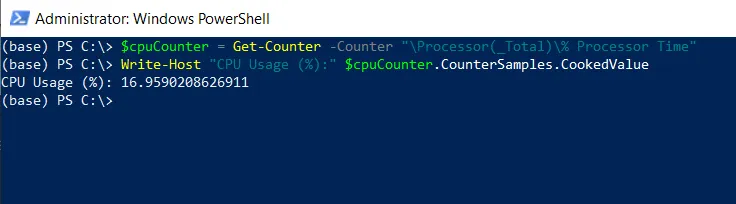
To get CPU usage in PowerShell, you can use the Get-Counter cmdlet to retrieve the performance counter data related to CPU usage.
The following example shows how you can do it.
# Get CPU usage counter
$cpuCounter = Get-Counter -Counter "\Processor(_Total)\% Processor Time"

# Display CPU usage
Write-Host "CPU Usage (%):" $cpuCounter.CounterSamples.CookedValue
In this script, the Get-Counter gets performance counter data, it retrieves the percentages of processor time for all CPUs and stores the result in the $cpuCounter variable.
The $cpuCounter.CounterSamples.CookedValue extracts the value of the CPU usage and displays it as a percentage.
After running the script, it displays the CPU usage on your system to the terminal.
Alternative Method Using Get-CimInstance
You can also use the following PowerShell script to get CPU usage in percentage.
Get-CimInstance -ClassName win32_processor | Measure-Object -Property LoadPercentage -Average
Output:
PS C:\> Get-CimInstance -ClassName win32_processor | Measure-Object -Property LoadPercentage -Average


Count    : 1
Average  : 11
Sum      :
Maximum  :
Minimum  :
Property : LoadPercentage
In this script, the Get-CimInstance retrieves information about the available processes using the Win32_processor class.
We then use the Measure-Object cmdlet to measure the average value of the LoadPercentage property. The -Average parameter returns the calculated average CPU usage percentage across all processors.
Conclusion
I hope the above article on getting CPU usage using PowerShell is helpful to you.
Related Articles
Performance Monitoring
- PowerShell Get-Process - Get process information
- PowerShell Get Memory Usage - Monitor memory per process
- PowerShell Get-Service - Monitor services
- PowerShell Get-Counter - Performance counters
Data Filtering & Selection
- PowerShell Select-Object - Select CPU properties
- PowerShell Where-Object - Filter by CPU threshold
- PowerShell ForEach-Object - Process CPU data
- PowerShell Measure-Object - Calculate CPU statistics
- PowerShell Sort-Object - Sort by CPU usage
Data Structures
- PowerShell Arrays - Store CPU monitoring data
- PowerShell Hashtables - Create CPU data structures
- PowerShell Variables - Store CPU values
Control Flow & Logic
- PowerShell If-Else Statement - Conditional CPU checking
- PowerShell Switch Statement - Switch-based thresholds
- PowerShell Try-Catch - Error handling
Output & Reporting
- PowerShell Output to File - Save CPU reports
- PowerShell Export CSV - Export CPU data
- PowerShell Format Table - Display CPU data
- PowerShell Output Table - Create output tables
Date & Time Operations
- PowerShell DateTime Format - Format monitoring timestamps
- PowerShell DateTime Operations - Time-based monitoring
Functions & Automation
- PowerShell Functions - Create CPU monitoring functions
- PowerShell Add-Member - Add custom CPU properties
Comprehensive Guides
- Complete PowerShell Guide - Full PowerShell with system monitoring
- Complete PowerShell Tutorial - Comprehensive course