How to Format a DateTime in PowerShell
In PowerShell, you can format DateTime objects using various methods and format strings.
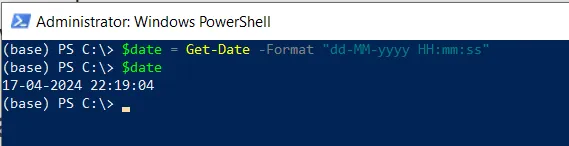
Method 1: Using the Get-Date with the -Format parameter
$date = Get-Date -Format "dd-MM-yyyy HH:mm:ss"
$date
This example will output the current date in the specified format “dd-MM-yyyy HH:mm:ss”.
Method 2: Using the ToString() method with a custom format string
$date = (Get-Date).ToString("MM-dd-yyyy HH:mm:ss")
$date
This example outputs the current date in a custom format “MM-dd-yyyy HH:mm:ss”.
Method 3: Using the .NET format specifiers
$date = Get-Date -Format "d"
$date
This example outputs the current date and time in a specific format.
Commonly Used Format Specifiers
yyyy: Four-digit year.MM: Two-digit month (01-12).dd: Two-digit day (01-31).HH: Two-digit hour (00-23).mm: Two-digit minute (00-59).ss: Two-digit second (00-59).
Format DateTime Using Get-Date with the -Format Parameter
In the script, the Get-Date cmdlet with the -Format parameter specifies the “dd-MM-yyyy HH:mm:ss” format.
After running the script, this will output the current date and time in the format “dd-MM-yyyy HH:mm:ss”.
Format DateTime Using the ToString() method
You can use the ToString() method with a custom format string to format a DateTime object in PowerShell.
This will output the current date and time in the format: MM-dd-yyyy HH:mm:ss.
Format DateTime Using the .NET format Specifiers
Another way to format a DateTime object is to use the .NET format specifiers.
This will output the current date and time in the format: “MM/dd/YYYY” format.
Conclusion
I hope the above article on how to format a DateTime object in PowerShell is helpful to you.
Related Articles
Date & Time Operations
- PowerShell DateTime Operations - Date arithmetic and operations
- PowerShell Get-Date - Get current date/time
- PowerShell Subtract Dates - Calculate date differences
- PowerShell Subtract Time - Calculate time differences
File Date Operations
- PowerShell Get Folder Creation Date - Get folder dates
- PowerShell Change Created Date - Modify creation dates
- PowerShell Change Modified Date - Modify modification dates
- PowerShell Compare File Dates - Compare file dates
- PowerShell List Files by Date - Sort by date
String Operations
- PowerShell Strings - String manipulation
- PowerShell Replace Strings - String replacement
- PowerShell String Methods - String method reference
Data Processing & Selection
- PowerShell Select-Object - Select and format data
- PowerShell Where-Object - Filter by date
- PowerShell ForEach-Object - Process date collections
- PowerShell Format Table - Format date output
Variables & Storage
- PowerShell Variables - Store date values
- PowerShell Hashtables - Store date data
- PowerShell Arrays - Work with date arrays
File Operations
- PowerShell Get File Properties - Get file dates
- PowerShell List Files - List files with dates
- PowerShell Get-Content - Read file data with dates
- PowerShell Output to File - Write dated output
Control Flow & Logic
- PowerShell If-Else Statement - Conditional date checking
- PowerShell Switch Statement - Switch-based logic
- PowerShell Try-Catch - Error handling
Data Export & Conversion
- PowerShell Export CSV - Export date data
- PowerShell Import CSV - Import date data
- PowerShell Convert - Convert date formats
Functions & Organization
- PowerShell Functions - Create date formatting functions
- PowerShell Add-Member - Add date properties
System Operations
- PowerShell Get-Process - Process creation dates
- PowerShell Get-Service - Service start times
Comprehensive Guides
- PowerShell Complete Guide - Full PowerShell with date operations
- Complete PowerShell Tutorial - Comprehensive course