How to Get Network Adapter Driver Version Using PowerShell
To get the network adapter driver version using PowerShell, use the Get-NetAdapter cmdlet. The Get-NetAdapter command retrieves all the physical and virtual network adapter information. It has a DriverVersion property that contains the network driver version.
In this article, we will discuss how to find the network adapter driver version on the system using PowerShell and get the driver version of a specific network adapter.
How to Find Network Adapter Driver Version using PowerShell
To find the Network Adapter Driver version using PowerShell, follow the steps given below.
- Open PowerShell - Launch the PowerShell terminal with Administrator privileges.
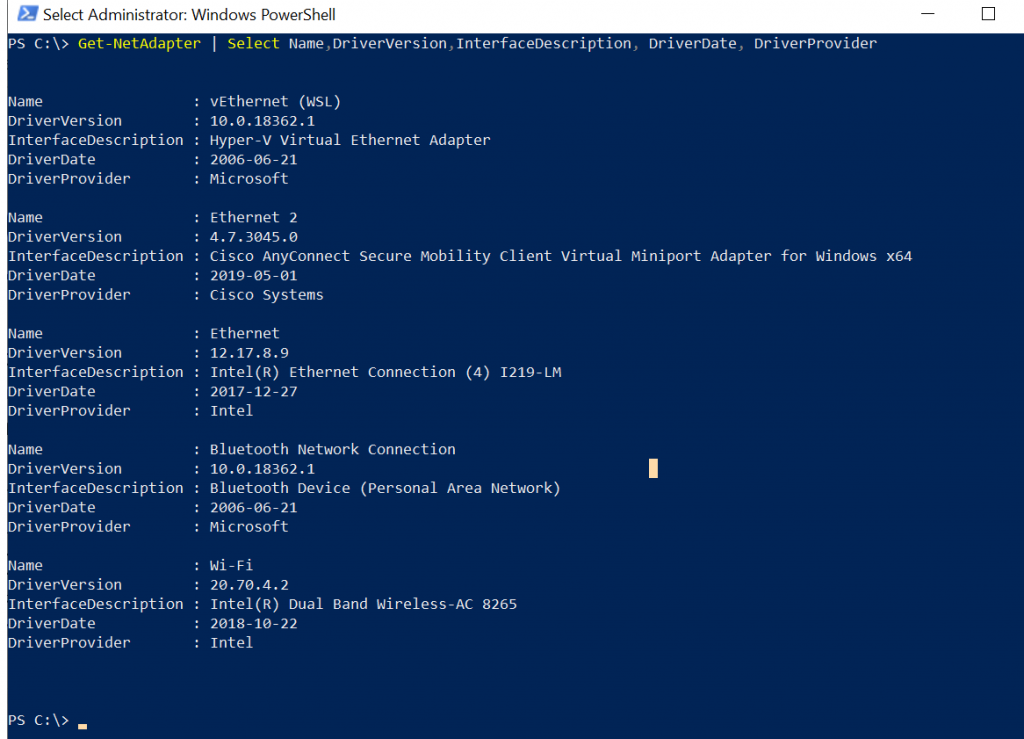
- Find the network adapter driver version - Run the following PowerShell command to retrieve information about the network adapter such as Name, DriverVersion, DriverDate, DriverProvider, and InterfaceDescription.
Get-NetAdapter | Select Name,DriverVersion,InterfaceDescription, DriverDate, DriverProvider
In the above PowerShell script, the Get-NetAdapter cmdlet returns a list of all network adapters on the system. The DriverVersion property contains the network adapter driver version.
The output of the above PowerShell script displays a list of all network adapters on the system with their DriverVersion.
Cool Tip: How to get network adapter status using PowerShell!
How to Get Driver Version of a Specific Network Adapter using PowerShell
To get the driver version of a specific network adapter using PowerShell, use the Get-NetAdapter cmdlet.
Get-NetAdapter -Name Ethernet | Select Name, DriverVersion, InterfaceAdminStatus, DriverDate
In the above PowerShell script, the Get-NetAdapter command gets the driver version of the network adapter “Ethernet” which is 12.17.8.9
The output of the above script to get the driver version for the specified network adapter is:
PS C:\> Get-NetAdapter -Name Ethernet | Select Name, DriverVersion, InterfaceAdminStatus, DriverDate

Name     DriverVersion InterfaceAdminStatus DriverDate
----     ------------- -------------------- ----------
Ethernet 12.17.8.9                        1 2017-12-27


PS C:\>
Cool Tip: How to get network adapter IP address using PowerShell!
Conclusion
I hope the above article on how to find the network adapter driver version using the PowerShell Get-NetAdapter cmdlet is helpful to you.
Related Articles
Network Adapter Information
- PowerShell Get-NetAdapter - Get network adapter details
- PowerShell Network Adapter Status - Check adapter status
- PowerShell Network IP Address - Get IP addresses
- PowerShell Network Hub - Complete network management guide
Data Selection & Filtering
- PowerShell Select-Object - Select adapter properties
- PowerShell Where-Object - Filter network adapters
- PowerShell ForEach-Object - Process adapters
- PowerShell Measure-Object - Calculate adapter metrics
Display & Formatting
- PowerShell Format Table - Format network output
- PowerShell Output Table - Create network data tables
- PowerShell Format List - List format display
Control Flow & Logic
- PowerShell If-Else Statement - Conditional adapter logic
- PowerShell Switch Statement - Switch driver versions
- PowerShell Try-Catch - Error handling
- PowerShell For Loops - Loop through adapters
Variables & Collections
- PowerShell Variables - Store adapter data
- PowerShell Arrays - Work with adapter arrays
- PowerShell Hashtables - Store adapter config
- PowerShell Add-Member - Add custom adapter properties
Output & Export
- PowerShell Output to File - Export driver versions
- PowerShell Export CSV - Export adapter data to CSV
- PowerShell Import CSV - Import adapter configuration
String Operations
- PowerShell Strings - String manipulation for driver data
- PowerShell Replace Strings - Modify driver version text
System Monitoring
- PowerShell Get-Process - Process network information
- PowerShell Get-Service - Network service status
- PowerShell Get-WmiObject - WMI network device info
- PowerShell Get-CimInstance - CIM network information
Functions & Automation
- PowerShell Functions - Create network driver functions
- PowerShell Group-Object - Group adapters by driver version
- PowerShell Measure-Object - Count adapters and drivers
Registry & System Info
- PowerShell Registry - Registry driver information
- PowerShell Get-ItemProperty - Retrieve registry properties
- PowerShell Environment Variables - System environment info
Comprehensive Guides
- Complete PowerShell Guide - Full PowerShell reference
- Complete PowerShell Tutorial - Comprehensive course