How to Get Network Adapter IP Address using PowerShell
To get the network adapter IP address using PowerShell, use the Get-NetIPAddress cmdlet. The Get-NetIPAddress command gets the IP address configuration such as IPv4 addresses, IPv6, subnet mask, default gateway, and other information about an IP address.
In this article, we will discuss how to get the network adapter IP address using the PowerShell Get-NetIPAddress command and get the IP address for the specific network adapter.
How to Get the IP addresses for All Network Adapters on a Computer
The Get-NetIPAddress cmdlet in PowerShell can be used to get the IP addresses for all network adapters on a system.
Get-NetIPAddress | Format-Table
In the above PowerShell script, the Get-NetIPAddress command returns a list of objects, each of which represents an IP address. Each object has properties such as Interfacealias, IPAddress, SubnetMask, DefaultGateway, etc…
PS C:\> Get-NetIPAddress | Format-Table

ifIndex IPAddress       PrefixLength PrefixOrigin SuffixOrigin AddressState
------- ---------       ------------ ------------ ------------ ------------ ----------
1       ::1             128 WellKnown    WellKnown    Preferred
9       169.254.13.183  16 WellKnown    Link         Tentative
22      172.27.23.061   28 Manual       Manual       Preferred
11      192.168.131.5   24 Manual       Manual       Tentative
11      169.254.0.144   16 WellKnown    Link         Tentative
12      169.254.54.89   16 WellKnown    Link         Tentative
20      169.254.224.112 16 WellKnown    Link         Tentative
5       192.168.1.103   24 Dhcp         Dhcp         Preferred
1       127.0.0.1       8 WellKnown    WellKnown    Preferred
How to Get the IP Address for the Specific Network Adapter using PowerShell
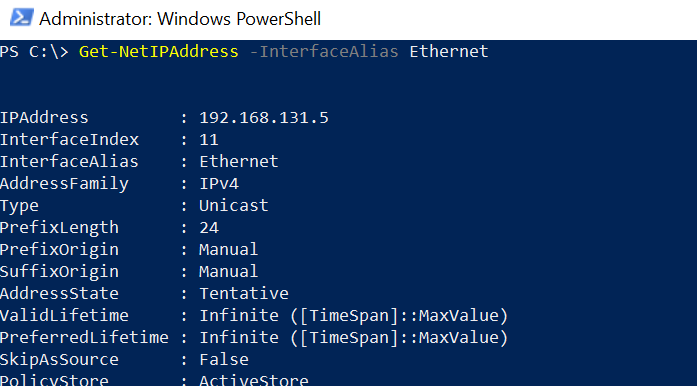
To get the IP address for the specific network adapter named “Ethernet” using PowerShell, use the Get-NetIPAddress command with -InterfaceAlias parameter to specify the name network adapter name.
Get-NetIPAddress -InterfaceAlias Ethernet
The output of the above PowerShell script to find the IP address of the Ethernet network adapter is displayed with all IP configuration details.
Cool Tip: How to get the network driver version using PowerShell!
Conclusion
I hope the above article on how to get the IP address of the network adapter using the PowerShell Get-NetIPAddress cmdlet is helpful to you.
Related Articles
Network Adapter Operations
- PowerShell Get-NetAdapter - Get network adapters
- PowerShell Network Adapter Status - Check adapter status
- PowerShell Network Driver Version - Get driver information
- PowerShell Network Hub - Complete network management guide
IP & Configuration
- PowerShell Get-NetIPAddress - IP address information
- PowerShell Get-NetIPConfiguration - IP configuration
- PowerShell Get-NetRoute - Routing information
- PowerShell Get-DnsClient - DNS client configuration
Data Processing & Display
- PowerShell Select-Object - Select properties
- PowerShell Where-Object - Filter network data
- PowerShell ForEach-Object - Process adapters
- PowerShell Format Table - Format output
- PowerShell Measure-Object - Calculate metrics
Control Flow & Logic
- PowerShell If-Else Statement - Conditional logic
- PowerShell Switch Statement - Switch-based logic
- PowerShell Try-Catch - Error handling
- PowerShell For Loops - Loop through adapters
Variables & Storage
- PowerShell Variables - Store network data
- PowerShell Arrays - Work with adapter collections
- PowerShell Hashtables - Store configuration data
- PowerShell Add-Member - Add custom properties
Output & Export
- PowerShell Output to File - Export network data
- PowerShell Export CSV - Export to CSV
- PowerShell Format Table - Display formatted
- PowerShell Output Table - Create tables
String Operations
- PowerShell Strings - String manipulation
- PowerShell Replace Strings - Find and replace
System Administration
- PowerShell Get-Process - Process information
- PowerShell Get-Service - Service information
- PowerShell Registry - Registry network settings
Functions & Organization
- PowerShell Functions - Create reusable functions
- PowerShell Measure-Object - Aggregate data
- PowerShell Group-Object - Group by adapter
Comprehensive Guides
- Complete PowerShell Guide - Full PowerShell reference
- Complete PowerShell Tutorial - Comprehensive course