How to Get Folder Size in GB in PowerShell
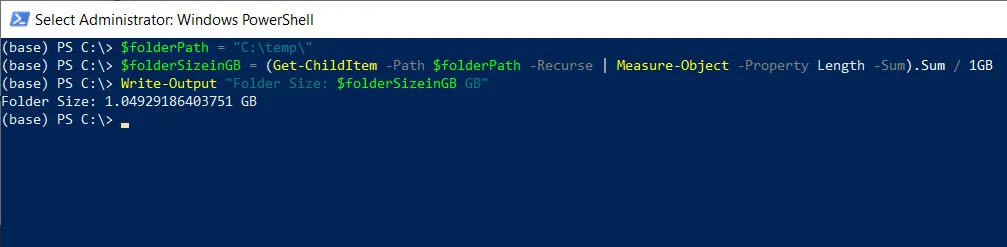
To get the size of a folder in gigabytes (GB) using PowerShell, you can use the Get-ChildItem cmdlet to list the items in the folder, and then calculate the total size of those items.
Method 1: Using Get-ChildItem with Measure-Object cmdlet
(Get-ChildItem -Path $folderPath -Recurse | Measure-Object -Property Length -Sum).Sum /1GB
This example will return the folder size in GB.
Get Folder Size in GB using the Get-ChildItem cmdlet in PowerShell
Use the Get-ChildItem cmdlet in PowerShell to retrieve the files and folders from the specified directory and then the Measure-Object cmdlet to compute the total size of these items.
# specify the folder path
$folderPath = "C:\temp\"

# compute the folder size in GB
$folderSizeinGB = (Get-ChildItem -Path $folderPath -Recurse | Measure-Object -Property Length -Sum).Sum / 1GB

# output the size in gigabytes
Write-Output $folderSizeinGB
In this script, we define a variable $folderSize to store the folder size for which we want to compute the size in GB.
We then use the Get-Chidltem cmdlet with the -Recurse parameter to retrieve all files and folders from the specified $folderPath and pipe the output to the Measure-Object cmdlet.
The Measure-Object cmdlet calculates the sum of the Length property (file size in bytes) of all items in the folder. We then divide the total bytes by 1GB to get the total folder size in GB.
Finally, we use the Write-Output cmdlet, which outputs the folder size in GB.
Conclusion
I hope the above article on how to get folder size in GB using PowerShell is helpful to you.
Related Articles
File & Directory Operations
- PowerShell Get-ChildItem - List directory contents
- PowerShell List Files - List files in directory
- PowerShell Directory Listing - Directory operations
- PowerShell Get File Properties - File metadata
Disk & Storage Operations
- PowerShell Get-Partition-Size - Partition size calculation
- PowerShell Get-Partition - Get partition information
- PowerShell Get-Disk - Get disk properties
Data Calculation & Aggregation
- PowerShell Measure-Object - Calculate totals and statistics
- PowerShell Group-Object - Group files by properties
Data Selection & Filtering
- PowerShell Select-Object - Select file properties
- PowerShell Where-Object - Filter files by size
- PowerShell ForEach-Object - Process multiple files
Date & Time Operations
- PowerShell DateTime Format - Format date information
- PowerShell Get Folder Creation Date - Folder timestamps
Display & Formatting
- PowerShell Format Table - Format file output
- PowerShell Output Table - Create file tables
- PowerShell Format List - List format display
Control Flow & Logic
- PowerShell If-Else Statement - Conditional file operations
- PowerShell Switch Statement - Switch file logic
- PowerShell Try-Catch - Error handling
- PowerShell For Loops - Loop through folders
Variables & Collections
- PowerShell Variables - Store folder data
- PowerShell Arrays - Work with file arrays
- PowerShell Hashtables - Store folder configuration
- PowerShell Add-Member - Add custom file properties
Output & Export
- PowerShell Output to File - Export size information
- PowerShell Export CSV - Export to CSV
- PowerShell Import CSV - Import file data
File Management
- PowerShell Delete Old Files - Delete old folders
- PowerShell Count Files - Count folder contents
- PowerShell List Files By Date - Sort by date
Functions & Automation
- PowerShell Functions - Create folder size functions
- PowerShell Measure-Object - Aggregate file statistics
Comprehensive Guides
- Complete PowerShell Guide - Full PowerShell reference
- Complete PowerShell Tutorial - Comprehensive course