How to Get MD5 Hash in PowerShell
In PowerShell, you can compute the MD5 hash value of a string or file using the Get-FileHash cmdlet. The Get-FileHash command uses the Algorithm parameter to specify the hash algorithm you want to use.
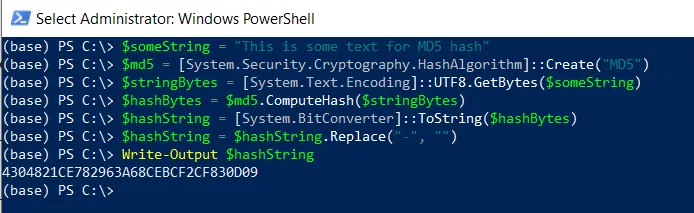
Get MD5 Hash of a String in PowerShell
To get the MD5 hash of a string in PowerShell, you can use the [System.Security.Cryptography.MD5] .NET class.
# Define the string
$someString = "This is some text for MD5 hash"

# Convert the string to bytes
$stringBytes = [System.Text.Encoding]::UTF8.GetBytes($someString)

# Create a MD5 hash object
$md5 = [System.Security.Cryptography.HashAlgorithm]::Create("MD5")

# Compute the MD5 hash
$hashBytes = $md5.ComputeHash($stringBytes)

# Convert the hash bytes to a hexadecimal string
$hashString = [System.BitConverter]::ToString($hashBytes)

$hashString = $hashString.Replace("-", "")

# Output the MD5 hash of a string
Write-Output $hashString
In this script, the $someString variable holds the string data. We convert the string into the bytes and store it into the $stringBytes variable.
[System.Security.Cryptography.MD5]::Create() method creates an instance of the MD5 hash algorithm. The ComputeHash() method computes the hash value of the input byte array. Later, we convert the hash bytes to a hexadecimal string.
Get MD5 Hash of a File in PowerShell
To get the MD5 hash of a file in PowerShell, you can use the Get-FileHash cmdlet with the MD5 Algorithm.
# Define the file path

$filePath = "C:\temp\log\system_log.txt"

# Get the file hash using the MD5 algorithm

$fileHash = Get-FileHash -Path $filePath -Algorithm MD5

# Output the hash of a file

Write-Output $fileHash.Hash
In the above PowerShell script, the $filePath variable stores the path to the file. The Get-FileHash cmdlet is used to compute the hash value of a file $filePath using the MD5 algorithm.
Finally, it outputs the MD5 file hash to the console.
Conclusion
I hope the above article on getting the MD5 hash value of a string or file in PowerShell is helpful to you.
Related Articles
File Information & Properties
- PowerShell Get File Properties - File metadata
- PowerShell Get File Hash - File integrity checking
- PowerShell Get File Extension - Extract extension
- PowerShell Get File Version - Version information
- PowerShell Get File Owner - File ownership
File Management Operations
- PowerShell List Files - List directory contents
- PowerShell Directory Listing - Navigate directories
- PowerShell Delete All Files - Delete files
- PowerShell Rename Files - Rename files in bulk
String Operations
- PowerShell Strings - String manipulation
- PowerShell Replace Strings - String replacement
Data Selection & Filtering
- PowerShell Select-Object - Select file properties
- PowerShell Where-Object - Filter files by criteria
- PowerShell ForEach-Object - Process each file
- PowerShell Get-ChildItem Filter - Advanced filtering
Display & Output
- PowerShell Format Table - Format output
- PowerShell Write-Output - Display output
- PowerShell Output to File - Write to files
Control Flow & Logic
- PowerShell If-Else Statement - Conditional logic
- PowerShell For Loops - Loop through files
- PowerShell Try-Catch - Error handling
Variables & Collections
- PowerShell Variables - Store hash data
- PowerShell Arrays - Work with file arrays
- PowerShell Hashtables - Store mappings
- PowerShell Add-Member - Add custom properties
Output & Export
- PowerShell Export CSV - Export to CSV
- PowerShell Import CSV - Import from CSV
File Path Operations
- PowerShell Test-Path - Check path existence
- PowerShell Get-Item - Get item objects
Functions & Automation
- PowerShell Functions - Create reusable functions
- PowerShell Measure-Object - Calculate statistics
Comprehensive Guides
- Complete PowerShell Guide - Full PowerShell reference
- Complete PowerShell Tutorial - Comprehensive course